Choosing the right web hosting is one of the most critical decisions you’ll make when launching a website. Whether you’re starting a blog, building an online store, or creating a business website, your hosting provider directly impacts your site’s speed, security, and success.
In this comprehensive web hosting guide for 2025, you’ll discover everything you need to know about web hosting, from understanding different hosting types to selecting the best provider for your specific needs.
- What is Web Hosting?
- Why Choosing the Right Web Hosting Matters
- Types of Web Hosting Explained
- Key Features to Look for in Web Hosting
- Best Web Hosting Providers in 2025
- How to Choose the Best Web Hosting for Your Needs
- Common Web Hosting Mistakes to Avoid
- Web Hosting FAQs
- Essential Web Hosting Terms to Know
- Final Thoughts: Choosing Your Web Hosting Provider
- Additional Resources
What is Web Hosting?
Web hosting is a service that makes your website accessible on the internet. When you buy web hosting, you rent space on a server. Your website’s files, images, and data are stored there.
Think of web hosting like renting an apartment for your website. The hosting provider owns the building (server). They maintain it and keep it connected to the internet 24/7. This way, visitors can access your website anytime.
According to W3Techs, there are over 1.1 billion websites online. Every single one requires web hosting to function.
Why Choosing the Right Web Hosting Matters
Your web hosting provider affects many important things:
- Website Speed: Faster loading improves user experience and Google rankings
- Uptime: Good hosting keeps your site online 99.9%+ of the time
- Security: It protects your website from hackers and malware
- SEO Rankings: Site speed and uptime impact search engine rankings
- Scalability: Your site can grow as traffic increases
- Customer Support: You get quick help when problems arise
Poor hosting can cause slow loading times and frequent downtime. It can also lead to security problems and lost revenue.
Types of Web Hosting Explained
1. Shared Hosting
Best for: Beginners, small blogs, personal websites, low-traffic sites
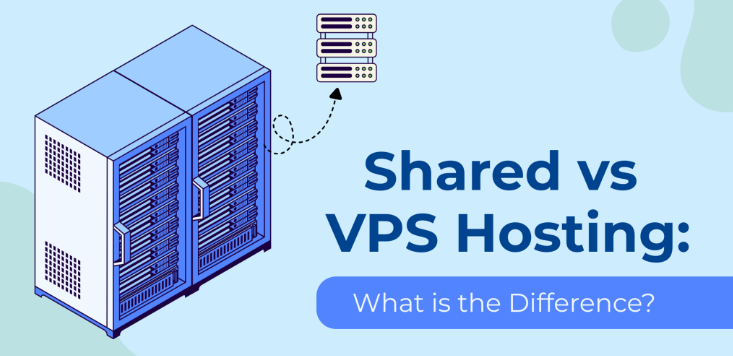
Shared hosting means your website shares server resources with other websites. These resources include CPU, RAM, and disk space. It’s the most affordable option but has some limitations.
Pros:
- Most affordable ($2-10/month)
- Easy to use with cPanel
- No technical knowledge required
- Perfect for getting started quickly
Cons:
- Limited resources and bandwidth
- Other sites can slow down your site
- Less control over server settings
- Not good for high-traffic websites
Popular Shared Hosting Providers:
- Bluehost – Officially recommended by WordPress.org
- HostGator – User-friendly with unlimited bandwidth
- SiteGround – Excellent customer support and speed
- DreamHost – 97-day money-back guarantee
Price Range: $2.95 – $10.99/month
2. VPS Hosting (Virtual Private Server)
Best for: Growing websites, medium-traffic sites, developers, online stores
VPS hosting gives you dedicated resources within a shared server. You get guaranteed RAM, CPU, and storage. This offers better performance than shared hosting.
Pros:
- Dedicated resources mean consistent performance
- Root access for customization
- Resources scale as your site grows
- Better security than shared hosting
Cons:
- More expensive than shared hosting
- Needs some technical knowledge
- You manage the server (unless it’s managed VPS)
Popular VPS Hosting Providers:
- DigitalOcean – Developer-friendly cloud infrastructure
- Linode – High-performance Linux VPS
- Vultr – Global data centers and quick deployment
- A2 Hosting – Turbo servers with SSD storage
Price Range: $20 – $100+/month
3. Cloud Hosting
Best for: Websites with changing traffic, high-traffic sites, businesses needing maximum uptime
Cloud hosting uses multiple servers that work together. They host your website as a team. If one server fails, another takes over. This means almost zero downtime.
Pros:
- Excellent reliability and uptime (99.99%+)
- Easy to scale on demand
- Pay-as-you-go pricing available
- Great for handling traffic spikes
Cons:
- Can be more expensive
- Pricing varies with traffic
- Needs technical knowledge for best results
Popular Cloud Hosting Providers:
- Amazon Web Services (AWS) – Industry leader with comprehensive services
- Google Cloud Platform – Powerful infrastructure with global reach
- Microsoft Azure – Enterprise-grade cloud solutions
- Cloudways – Managed cloud hosting simplified
Price Range: $10 – $500+/month (varies with usage)
4. Dedicated Hosting
Best for: Large enterprises, high-traffic websites, apps needing maximum resources
Dedicated hosting gives you an entire physical server. It’s exclusively for your website. You get complete control and maximum performance. All server resources are yours.
Pros:
- Maximum performance and resources
- Complete server control
- Enhanced security and privacy
- No resource sharing with others
Cons:
- Most expensive option
- Needs advanced technical skills
- You handle server maintenance
- Too much for small websites
Popular Dedicated Hosting Providers:
- Liquid Web – Fully managed dedicated servers
- InMotion Hosting – Excellent support and reliability
- HostGator Dedicated – Flexible configurations
Price Range: $80 – $500+/month
5. WordPress Hosting
Best for: WordPress websites, bloggers, content creators
This is specialized hosting made for WordPress websites. It often includes pre-installed WordPress and automatic updates. You also get WordPress-specific security features.
Pros:
- Built for WordPress performance
- Automatic WordPress updates and backups
- WordPress-specific security
- Expert WordPress support
Cons:
- Only works with WordPress sites
- Can cost more than basic shared hosting
- Some hosts limit plugin usage
Popular WordPress Hosting Providers:
- WP Engine – Premium managed WordPress hosting
- Kinsta – High-performance managed WordPress on Google Cloud
- Bluehost WordPress – Official WordPress recommendation
- Flywheel – Designer and agency-focused
Price Range: $15 – $300+/month
6. Managed Hosting
Best for: Business owners, non-technical users, those wanting hands-off management
Managed hosting means the hosting provider handles all technical aspects including updates, security, backups, and performance optimization.
Pros:
- Provider handles all technical maintenance
- Enhanced security and monitoring
- Automatic backups and updates
- Expert support available
Cons:
- More expensive than unmanaged hosting
- Less control over server configuration
- May restrict certain customizations
Popular Managed Hosting Providers:
- Nexcess – Managed WooCommerce and WordPress
- Pagely – Enterprise WordPress hosting
- Pressable – Managed WordPress for agencies
Price Range: $25 – $500+/month
Key Features to Look for in Web Hosting
1. Uptime Guarantee
Uptime is the percentage of time your website is online. Look for providers offering at least 99.9% uptime guarantee.
Even 99% uptime means your site could be down for over 7 hours per month. That’s a lot of lost visitors!
Check uptime monitoring services like UptimeRobot. These help you track your host’s actual performance.
2. Loading Speed
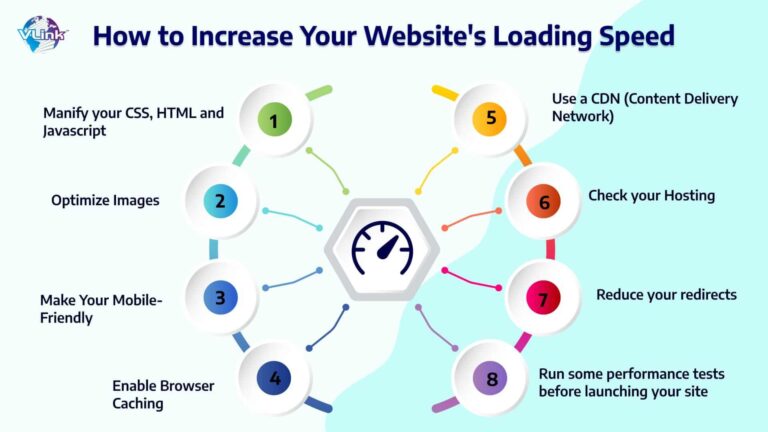
Website speed affects user experience and SEO rankings directly. Google’s research shows something important. 53% of mobile users leave sites that take longer than 3 seconds to load.
Look for hosts offering:
- SSD storage (faster than traditional HDD)
- Content Delivery Network (CDN) integration
- HTTP/3 and latest PHP versions
- Server-level caching
Test speeds with Google PageSpeed Insights and GTmetrix.
3. Security Features
Essential security features include:
- Free SSL certificates (HTTPS encryption)
- Regular malware scanning
- DDoS protection
- Automatic backups
- Firewall protection
- Two-factor authentication (2FA)
Let’s Encrypt provides free SSL certificates, which most modern hosts include automatically.
4. Customer Support
Quality support is crucial when technical issues arise. Look for:
- 24/7 availability via live chat, phone, and email
- Knowledgeable support staff
- Quick response times (under 5 minutes for chat)
- Comprehensive knowledge base and tutorials
Check reviews on Trustpilot and G2 before committing.
5. Scalability
Your hosting should grow with your website. Ensure your provider offers:
- Easy upgrade paths to higher plans
- One-click scaling options
- Multiple data center locations
- Load balancing capabilities
6. Backup and Restore
Regular backups protect your data from:
- Hacking attempts
- Accidental deletions
- Server failures
- Plugin conflicts
Look for:
- Daily automatic backups
- Easy one-click restore options
- Backup retention (30+ days)
- Downloadable backup files
7. Control Panel
A user-friendly control panel simplifies website management:
- cPanel: Industry standard, beginner-friendly
- Plesk: Modern alternative with clean interface
- Custom panels: Some hosts create proprietary systems
8. Email Hosting
Professional email addresses ([email protected]) enhance credibility. Check if hosting includes:
- Unlimited email accounts
- Sufficient storage per email
- Spam filtering
- Email forwarding
- Webmail access
Alternatively, use Google Workspace or Microsoft 365 for premium email solutions.
9. Money-Back Guarantee
Most reputable hosts offer 30-60 day money-back guarantees. This allows you to test the service risk-free before committing long-term.
10. Pricing and Renewal Rates
Important: Many hosts offer low introductory prices that increase significantly upon renewal. Always check:
- Renewal rates (can be 2-3x the introductory price)
- Contract length requirements
- Refund policies
- Additional costs (domain, SSL, backups)
Best Web Hosting Providers in 2025
Best Overall: Bluehost
Starting Price: $2.95/month
Bluehost is officially recommended by WordPress.org and offers excellent value for beginners. With 99.99% uptime, free domain for the first year, and 24/7 support, it’s an ideal starting point.
Best For: Beginners, WordPress sites, small businesses
Best for Performance: SiteGround
Starting Price: $2.99/month
SiteGround delivers exceptional speed with custom caching solutions and Google Cloud infrastructure. Known for outstanding customer support and security features.
Best For: Speed-focused sites, WordPress, growing businesses
Best VPS Hosting: DigitalOcean
Starting Price: $4/month
DigitalOcean provides developer-friendly cloud infrastructure with straightforward pricing and excellent documentation. Perfect for scaling applications.
Best For: Developers, scalable applications, tech-savvy users
Best Managed WordPress: WP Engine
Starting Price: $20/month
WP Engine offers premium managed WordPress hosting with excellent performance, automatic updates, and expert support on Google Cloud Platform.
Best For: Serious WordPress sites, businesses, agencies
Best Budget Option: Hostinger
Starting Price: $1.99/month
Hostinger provides remarkably affordable hosting without sacrificing essential features. Great performance for the price with 99.9% uptime guarantee.
Best For: Budget-conscious beginners, testing projects
Best for E-commerce: Shopify
Starting Price: $29/month
Shopify is a complete e-commerce platform with built-in hosting, perfect for online stores. No technical knowledge required with beautiful templates and payment processing.
Best For: Online stores, dropshipping, e-commerce businesses
Best Cloud Hosting: Cloudways
Starting Price: $11/month
Cloudways simplifies cloud hosting by offering managed services on top of AWS, Google Cloud, and DigitalOcean infrastructure.
Best For: Growing websites, applications, high-traffic sites
How to Choose the Best Web Hosting for Your Needs
Step 1: Identify Your Website Type
Different websites need different hosting:
Personal Blog: Shared hosting works great ($3-10/month)
Business Website: Try shared or VPS hosting ($10-50/month)
E-commerce Store: Use VPS or managed hosting ($30-100/month)
High-Traffic Site: Choose cloud or dedicated hosting ($50-500+/month)
WordPress Site: Get WordPress hosting ($15-50/month)
Step 2: Estimate Your Traffic
- 0-10,000 visitors/month: Shared hosting
- 10,000-100,000 visitors/month: VPS hosting
- 100,000-500,000 visitors/month: Cloud hosting
- 500,000+ visitors/month: Dedicated or enterprise cloud
Step 3: Set Your Budget
Be realistic about costs:
- Starter Budget ($3-10/month): Shared hosting
- Medium Budget ($10-50/month): VPS or managed WordPress
- Professional Budget ($50-200/month): Cloud or dedicated
- Enterprise Budget ($200+/month): Premium managed solutions
Remember to factor in renewal rates, which are typically higher than introductory prices.
Step 4: Check Technical Requirements
Ensure your hosting supports:
- Required PHP version
- Database type (MySQL, PostgreSQL)
- Storage space needs
- Bandwidth requirements
- SSL certificate
- Email accounts needed
Step 5: Read Reviews and Compare
Research providers on:
Focus on recent reviews regarding:
- Customer support responsiveness
- Actual uptime experiences
- Hidden fees
- Migration assistance
Step 6: Test Customer Support
Before purchasing, test their support:
- Ask pre-sales questions via live chat
- Check response times
- Evaluate knowledge and helpfulness
- Review their documentation quality
Step 7: Start with Short-Term Commitment
While longer contracts offer better pricing, start with a 1-year plan to:
- Test the service quality
- Verify uptime and speed
- Experience customer support
- Ensure it meets your needs
You can always extend once satisfied.
Common Web Hosting Mistakes to Avoid
1. Choosing Based on Price Alone
The cheapest hosting isn’t always the best value. Poor performance and downtime can hurt you. Weak support costs more in lost revenue and frustration.
2. Ignoring Renewal Rates
Introductory pricing can mislead you. A $2.95/month plan might renew at $9.99/month. Always check long-term costs before buying.
3. Over-Provisioning Resources
Don’t pay for dedicated hosting if you’re just starting. Start small and scale up as your traffic grows. This saves money.
4. Not Reading the Terms of Service
Understand the limits on:
- Resource usage (CPU, RAM)
- Bandwidth and storage
- Number of websites allowed
- Backup policies
Read the fine print carefully.
5. Neglecting Security
Never compromise on security features. SSL certificates are essential. Malware scanning and regular backups protect your site. These aren’t optional.
6. Choosing the Wrong Location
Server location affects loading speed. Choose a data center close to your target audience. Most providers offer multiple locations worldwide.
7. Not Planning for Growth
Select a provider with clear upgrade paths. Migrating hosts later takes time and creates risk. Plan ahead for success.
Web Hosting FAQs
Q: What’s the difference between web hosting and domain name? A domain name (yoursite.com) is your website’s address, while web hosting is the space where your website files are stored. You need both for a functioning website.
Q: Can I host my website for free? Yes, but free hosting comes with severe limitations: ads on your site, poor performance, no custom domain, limited storage, and unreliable uptime. It’s not recommended for serious websites.
Q: How much does web hosting cost? Web hosting ranges from $2-10/month for shared hosting to $500+/month for dedicated servers. Most small websites do well with $5-20/month plans.
Q: Can I switch web hosting providers later? Yes, you can migrate your website to a different host. Many providers offer free migration services, or you can use plugins like Duplicator for WordPress sites.
Q: Do I need technical knowledge to use web hosting? Not necessarily. Shared and managed hosting options are beginner-friendly with one-click installers and intuitive control panels. VPS and dedicated hosting require more technical expertise.
Q: What is bandwidth in web hosting? Bandwidth is the amount of data transferred between your website and visitors. Higher traffic requires more bandwidth. Most modern hosts offer “unlimited” bandwidth with fair usage policies.
Q: Is WordPress hosting different from regular hosting? WordPress hosting is optimized specifically for WordPress sites with features like automatic updates, WordPress-specific caching, and enhanced security. Regular hosting works with any CMS.
Q: What happens if my website gets too much traffic? On shared hosting, your site may experience slowdowns or downtime. Quality hosts will notify you and offer upgrade options. Plan ahead and scale before reaching limits.
Q: Do I need a separate email hosting service? Most web hosting includes email hosting, but many professionals prefer dedicated email services like Google Workspace or Microsoft 365 for better reliability and features.
Q: How do I know if a hosting provider is reliable? Check independent reviews, uptime guarantees, company history, and test their customer support. Look for transparent service level agreements (SLAs) and money-back guarantees.
Essential Web Hosting Terms to Know
- Uptime: Percentage of time your website is accessible online
- Bandwidth: Amount of data transferred monthly
- Disk Space: Storage capacity for your website files
- SSL Certificate: Security protocol encrypting data between server and visitor
- CDN: Content Delivery Network distributing your content globally for faster loading
- cPanel: Popular web hosting control panel interface
- FTP: File Transfer Protocol for uploading files to your server
- MySQL: Database management system used by WordPress and other platforms
- SSH: Secure Shell for encrypted server access
- DNS: Domain Name System translating domain names to IP addresses
Final Thoughts: Choosing Your Web Hosting Provider
Selecting the right web hosting provider is crucial. It determines your website’s success. This might seem overwhelming at first. But focus on these key factors:
Match hosting type to your needs. Start with shared hosting if you’re a beginner.
Prioritize reliability over price. You need 99.9%+ uptime. This is non-negotiable.
Don’t compromise on security. SSL, backups, and malware protection are essential.
Plan for growth. Choose a provider with clear scaling options.
Test customer support. You’ll need them when issues arise.
For most beginners, Bluehost or SiteGround work best. They offer great features, performance, and affordability. As your site grows, consider upgrading. Move to VPS or managed hosting for better performance.
Remember something important. You can always change hosting providers later. Don’t let analysis paralysis stop you from starting. Choose a reputable host and launch your website. Scale up as your needs evolve.
Additional Resources
Official Documentation
Performance Testing Tools
- GTmetrix – Website speed testing
- Pingdom – Website monitoring
- Google PageSpeed Insights – Performance analysis
- WebPageTest – Detailed performance metrics
Learning Resources
- DigitalOcean Tutorials – Server management guides
- Cloudflare Learning Center – Web performance and security
- MDN Web Docs – Web development documentation
- Stack Overflow – Developer community
Community Forums
About the Author